Game Development
2D and 3D design | Unity, Blender, Aseprite, C# Programming
Feathers of Ember (2D Game) is my biggest personal project and my greatest accomplishment so far. All of the artwork and animations were designed by me using Unity and Aseprite. The majority of the code I wrote myself, though some code was learnt and modified from tutorials none of it was copied and used in its original form. The idea was to design a framework for a 2D game that could be taken in almost any direction by creating and implementing additional systems in future.
My 3D modelling work explores a range of subjects including environmental assets, character modelling, and basic character animation. The video showcases several examples such as tree design, facial modelling, and a simple human character animated using a basic skeletal rig with articulated hands. The purpose of these exercises was to develop a stronger understanding of form, topology, and the fundamentals of character rigging and animation.
The ocean scene was created as part of a guided tutorial and focuses on producing realistic water and atmospheric effects. The project explores the simulation of ocean waves and the creation of a dynamic cloudy sky to achieve a natural and convincing environment. While the scene was built by following instructional material, it provided valuable experience in environmental rendering, lighting, and large-scale scene composition in Blender.
▼ Blog ▼
Back to top

Belated Update – 16/07/2023

I haven’t updated the blog in some time now, but that’s not say I haven’t been busy! I’ve been working on creating assets for the game, a start menu, and the opening scene.

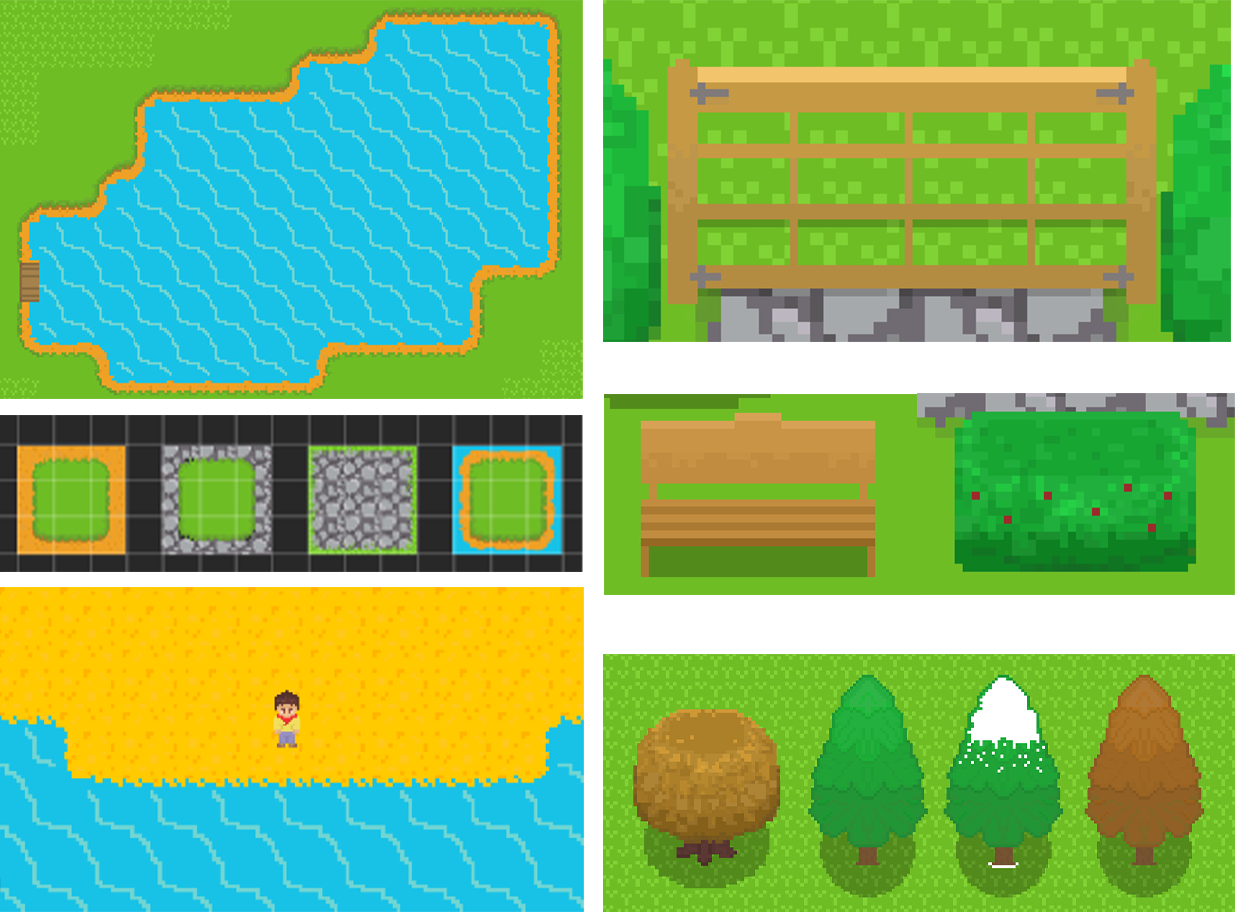
The start menu is the biggest piece of art I have ever done in Aseprite. Originally, it was going to be a practice run for the final product, but I liked how it was turning out, so I spent some more time working on it and I’m pleased with the result. The game also has a name, Feathers of Ember: The Rise of Solstice. ChatGPT helped with some ideas for the name and I really like it! Originally, I wasn't going to name the game as its only a personal project, but the start menu just didn't look right without a title. Designing the start menu brought another issue to my attention. That is, the variation in colour vibrancy on different devices. In a previous post I mentioned I had this issue from my laptop to my PC, but I had assumed that was due to the matte display on my laptop, but unfortunately this wasn’t the case. When I ran the game on my phone, the colours were dull and washed out. Today I spent half an hour adjusting the brightness of all of my game assets to rectify the issue and now the game looks as it should.

For the opening scene of the game, I want a UI letter to be displayed after the player presses the play button, this will give some context to why you are going to the island and where you should go once you arrive. I then wanted a cutscene of the player arriving on the beach at the bottom of the map by boat, once the cutscene is over the player will be free to explore the village and go on with their quest.

Initially, I’d planned for the boat to stop at the bottom of the beach, fade the screen to black while the player got off the boat, and then remove the black fade showing the player standing on the beach. This seemed like it was going to be more difficult, time consuming, and less effective than animating the player getting off the boat. So, I decided I’d go with the latter and animate the player getting off the boat.

First, I created a new camera to act as the cutscene camera and made it a child of the boat. Then, I disabled the main camera in my script and activated the cutscene camera. I made three empty game objects and assigned them with 2D colliders. I placed them in a horizontal row along the sea to serve as the path for the boat to follow. In the script, I applied left velocity to the boat when it collided with the start collider. It would then travel to the stop collider and play the jump off boat animation. For this to work, I drew the character onto the boat in Asperite. Next, I positioned the main character sprite in my game exactly where the drawn character would land. To avoid displaying two character sprites simultaneously, I had to make the main character sprite invisible while the boat approached and the animation played. The final frame of the animation depicted a crouching pose, so when the invisible player became visible again, it seamlessly blended with the animated character, creating the illusion of the player finishing the jump and standing up. This process required significant tweaking, as the character on the boat was part of the boat itself and did not have its own distinct coordinates for positioning the main character. After the animation played, I enabled the main camera and disabled the cutscene camera. The boat transitioned to another animation and sailed off without the player, eventually reaching its final collider and getting destroyed.

I’m really pleased with how the game is coming along. Next, I need to work on the UI letter that will be shown between the start screen and the boat cutscene and the start of the game will be in place.

Thanks for reading,

Jack

Start Menu
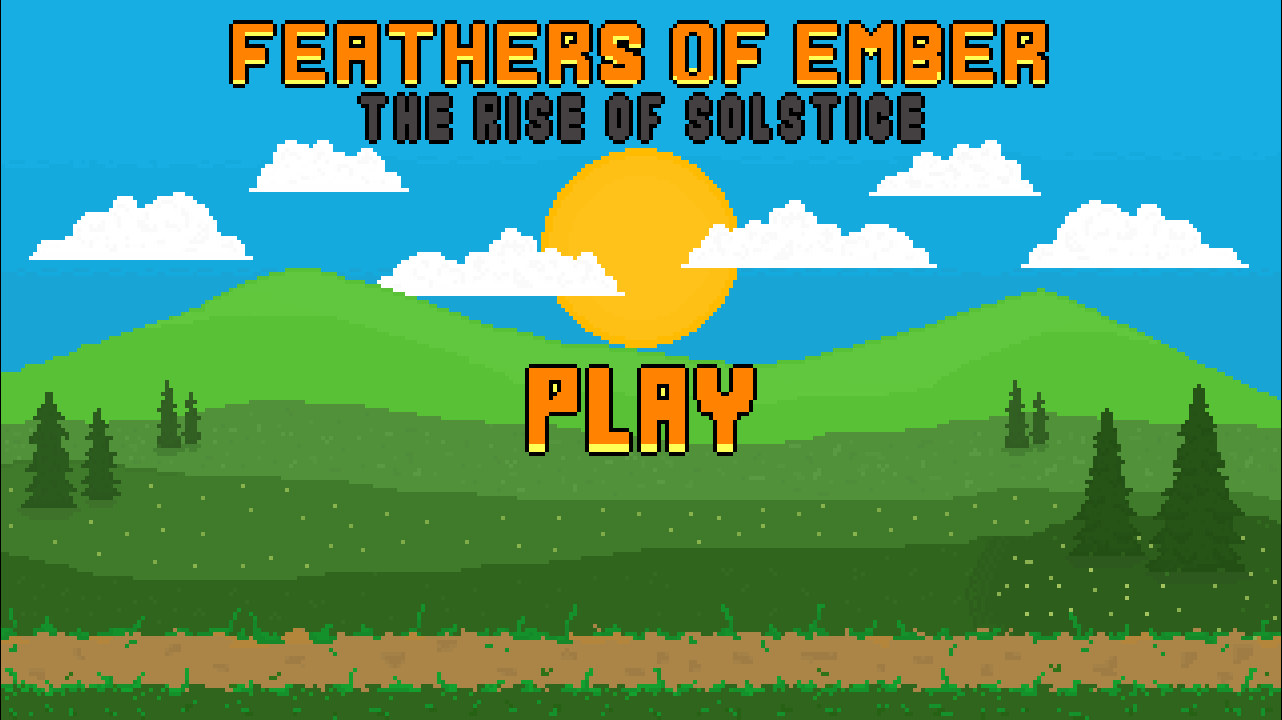
Blog Image 1

Asset Collage
Blog Image 1

Boat
Blog Image 1

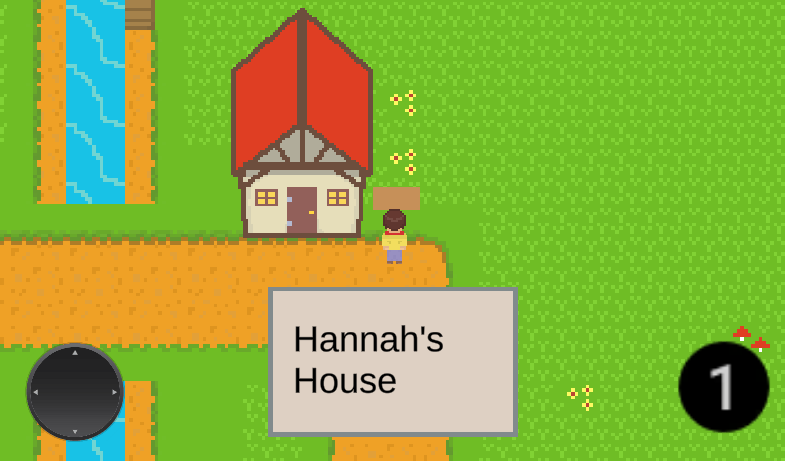
Signposts - 05/07/2023

Today, I created a basic signpost asset for the game. Players can interact with the signpost by approaching it and pressing the '1' button. This triggers the display of a UI dialogue box that contains relevant text information specific to that sign. The UI box remains visible until the player moves away, at which point it automatically closes. I tied this in with the dialogue system I implemented yesterday. Both systems utilize the same UI box and effectively replace the displayed text by disabling other text elements in the script.

Thanks for reading,

Jack

Signpost Text
Blog Image 1

Dialogue System Take Two – 04/07/2023

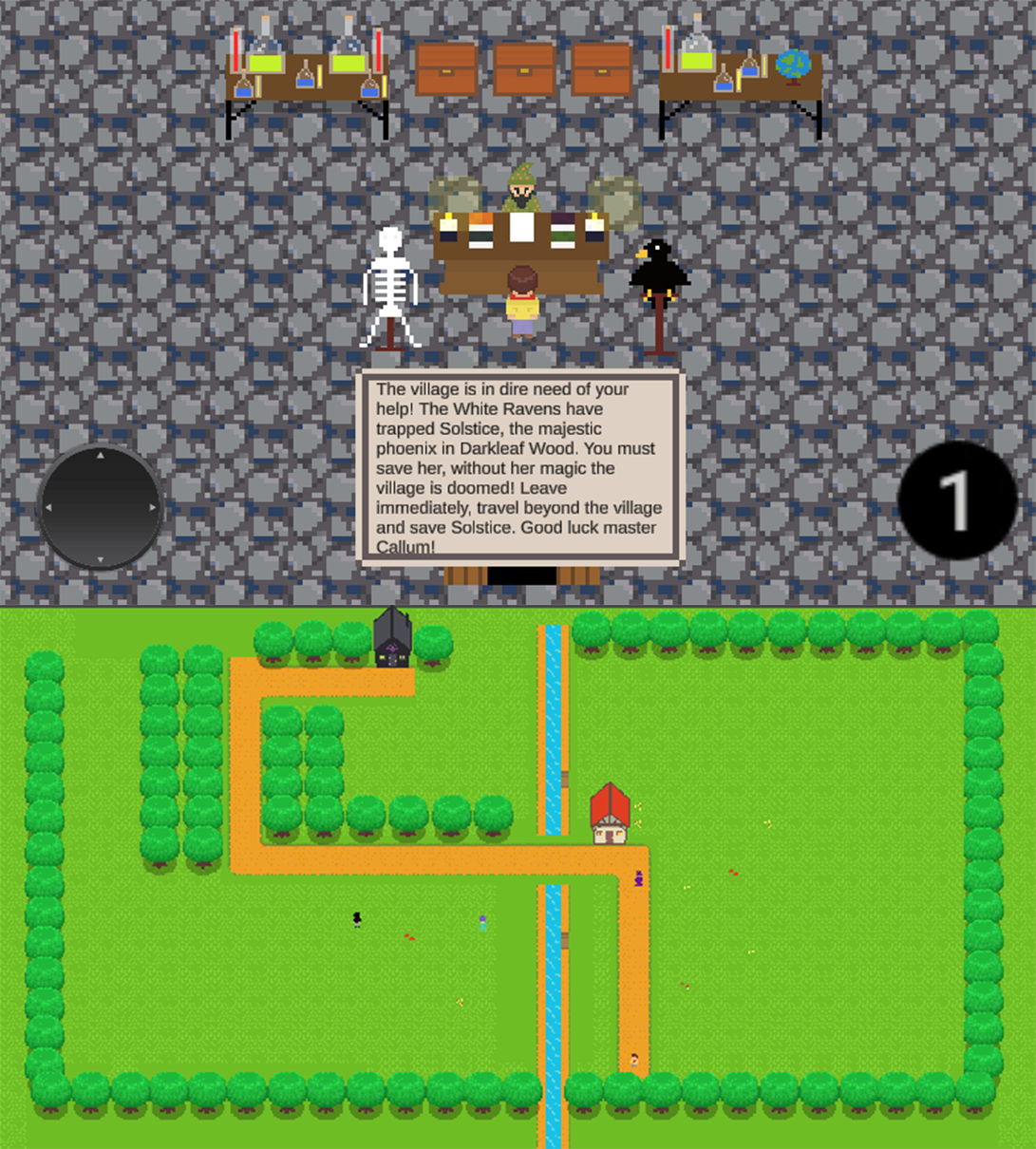
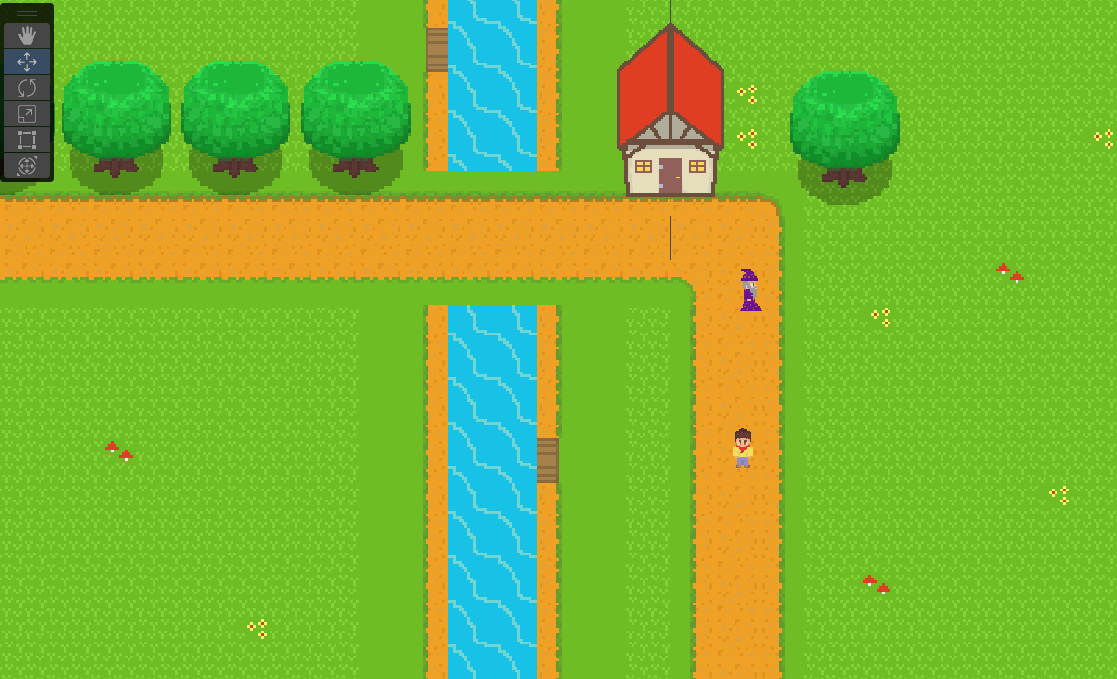
In a previous post I wrote that I had followed a YouTube tutorial to get a dialogue system set up, which I had. The dialogue tutorial I followed was fantastic and it worked great, I just decided I wanted to make a simpler version of my own. I’m sure my code isn’t the greatest, but I managed to get the dialogue system to function how I wanted, which is great! My approach was simple, I wanted the player to press a button when in range of an NPC to trigger the dialogue UI box and display the correct sentences, and once the player walks away the UI box would disappear. Although simple in theory, there were lots of hurdles along the way and it took a good couple of hours to get it working how I’d like.

My next task was to start designing the level with the end user in mind. So far, I had a small test area without boundaries or colliders to keep the player contained within the bounds of the level. I set about making some tree lined boarders and moving the wizards house to a more suitable location. I also set the teleportation coordinates for the mother’s house entry and exit.

Getting to this stage of the game’s development is exciting. Walking around the level in its current state, in and out of buildings, having conversations with NPCs makes it feel like the start of a real game. I’ve put a lot of hours of work into the project now, and this feels like a real milestone in the game’s development.

Thanks for reading,

Jack

Dialogue and Aerial View
Blog Image 1

Back in the Game! - 02/07/2023

Just a general update this morning. The website is completely up to date, I’ve added a scrolling text animation at the top of the page listing all current projects. I feel this stops the site from feeling so static and plain and gives visitors to my site a quick update of what I’m currently working on.

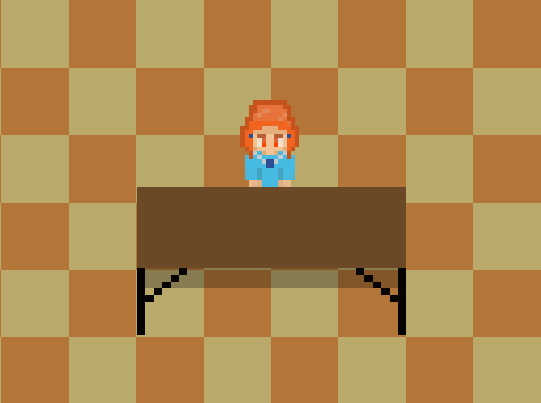
I’ve also resumed development on my 2D RPG project in Unity. Most of the game mechanics are now in place, so my aim for the next few weeks is to design more characters and buildings and get started on a storyline. This morning I designed a new sprite for the main characters mother along with a floor tile set for her house, I've included a screenshot below.

Thanks for reading,

Jack

Mother Sprite
Blog Image 1

3D Bust Model 2020 – 24/06/2023

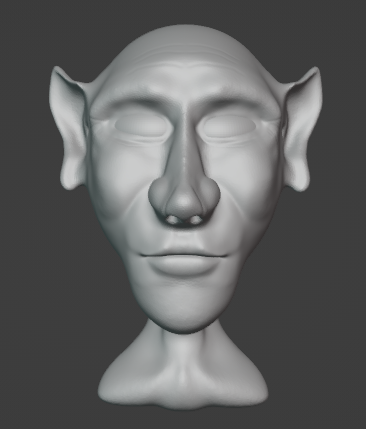
During the lockdown in 2020, I was furloughed from my job for three months. Luckily, I had recently bought a new gaming PC, so I decided to make the most of my time off by learning a new skill, this is when I got into game development and C# programming. Whilst searching for online courses I came across a YouTube tutorial that focused on sculpting an ogre head and bust using Blender. While I followed the tutorial as a reference, I wanted to make it my own, so I decided to create an elf character instead, I was really pleased with the result and thoroughly enjoyed the process of sculpting. Over the next few days, I’m hoping to do some more sculpting in Blender so I should have some more screenshots to upload to the blog very soon.

Jack

Elf Bust
Blog Image 1

Blender Tutorial – 24/06/2023

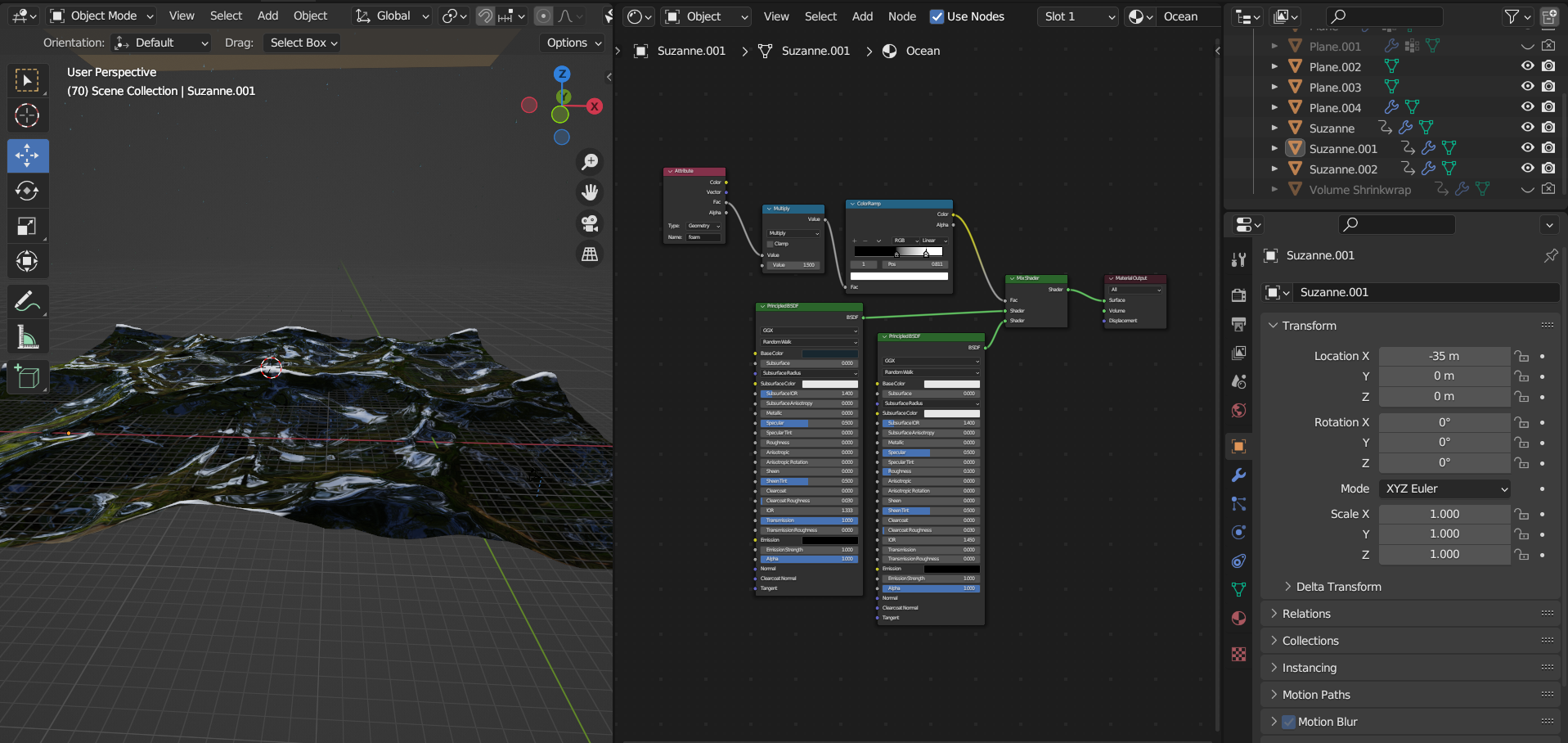
Last night I followed a fantastic YouTube tutorial to create a stormy ocean scene in Blender. This was a steep learning curve for me as prior to this I had only designed small assets and character models.

To design the ocean and waves, we used an ocean modifier in conjunction with multiple planes. We also utilized the particle system to create rain fall from a rain drop model we created. We created and shrink-wrapped a plane to the ocean and set the camera to the position of the plane, this allows the camera to move with the movement of the waves which gives a first-person perspective that you are floating in the ocean.

This was a far more advanced tutorial that anything I had done previously, and though I couldn’t replicate the ocean scene myself, I learnt a great deal just by navigating different systems within Blender and refamiliarizing myself with the hot keys. It’s also fun to create something that looks so realistic!

Thanks for reading,

Jack

GIF of Ocean Scene & Screenshot of Scene in Blender


Blog Image 1

YouTube Tutorial Blender/Unity - 11/06/2023

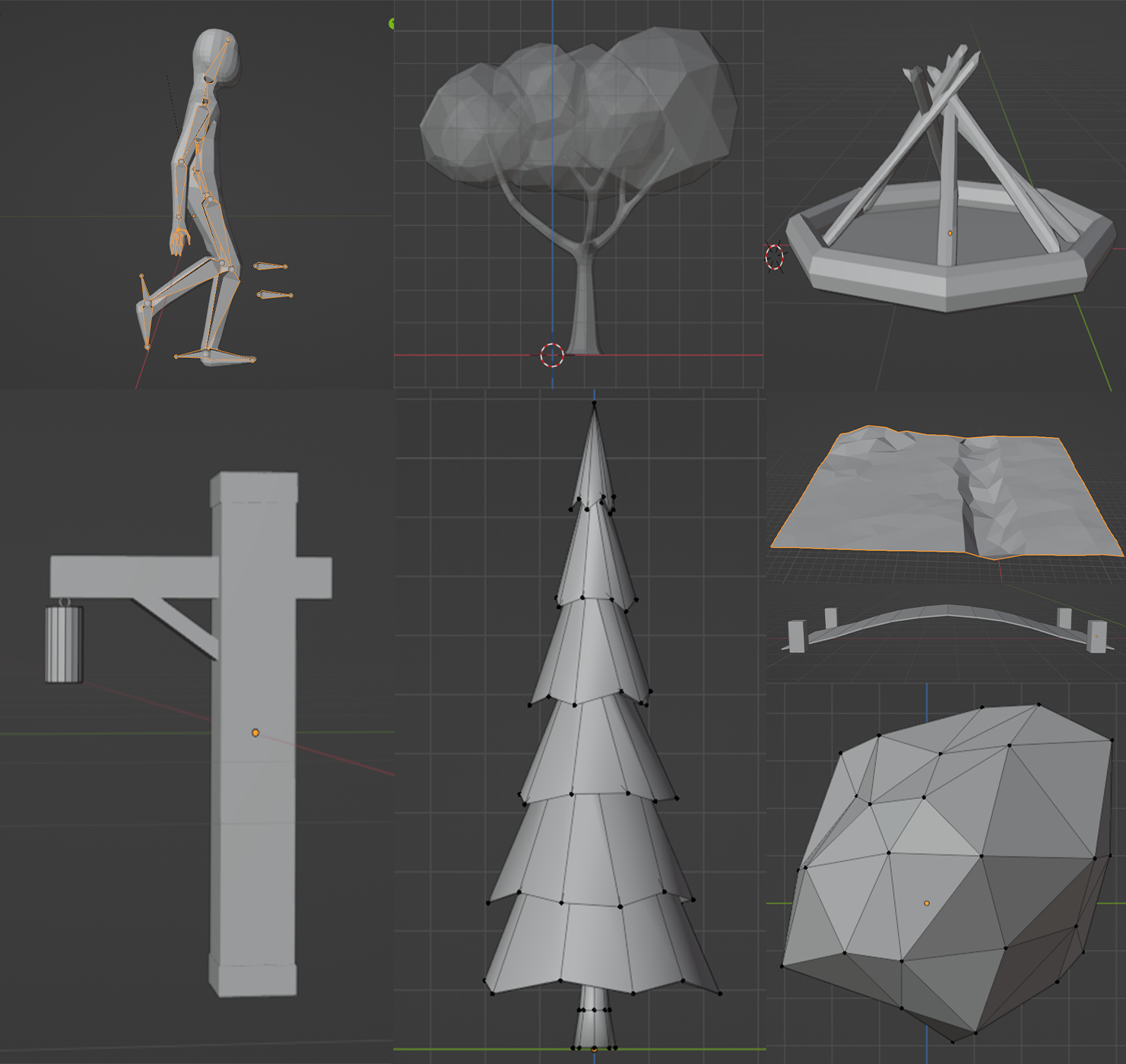
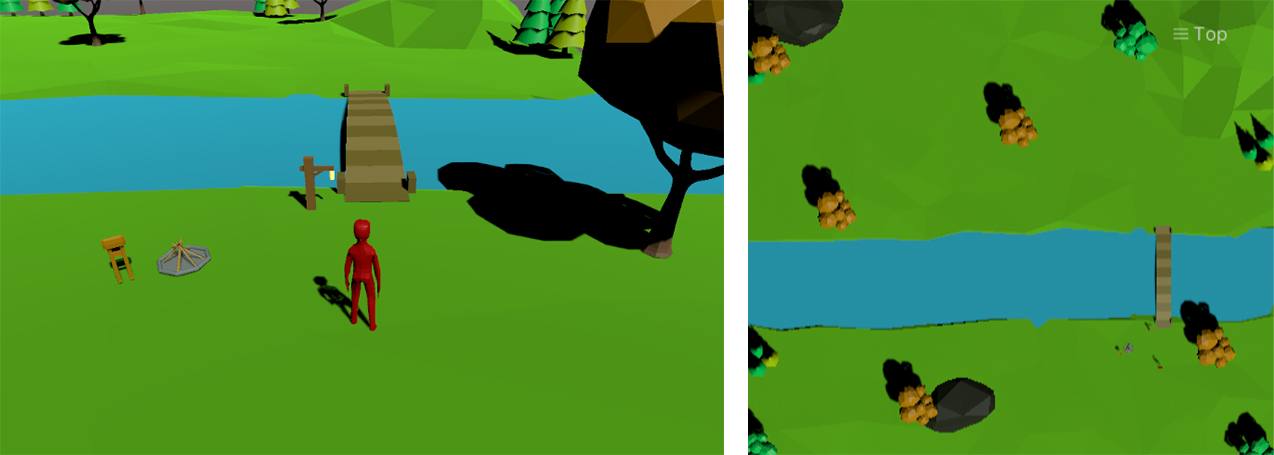
Quick post with a few screenshots of assets I made in Blender some time ago. I was following a 3D RPG YouTube tutorial which provided a free asset pack to follow along with, but I’ve never really liked the idea of using free assets. I understand that using free assets allows you to focus on the game development and coding, but I’d rather spend a bit more time learning how to design my own. So, I followed some tutorials on how to design and animate various assets before following along with the RPG tutorial. I’ve attached screenshots of individual assets in Blender and two showing the assets in the game view in Unity.

Thanks for reading,

Jack

Blender Assets
Blog Image 1

Game in Unity
Blog Image 1

General Update – 10/06/2023

I’ve had a bit of an impromptu break from the blog, so I have quite a backlog of posts that I’m aiming to get done over the next few days. I thought I’d use this entry as a quick overview of what I’ve been up to, then I’ll make some more detailed posts about each individual project.

  • 3D Cube Game: I finished making the 3D cube game. It was a great mini-project, and completing something I started gave a great sense of accomplishment.

  • Blender Assets: I’ve been doing some basic 3D design in Blender. Due to my main project being in 2D I haven’t used Blender for some time so, I wanted to refamiliarize myself with the workflow.

  • Website: I’ve made a few changes to the website layout. I’ve been using Photoshop to create collages from screenshots for a cleaner look. Additionally, I permanently overlaid the text onto the header image to ensure it is positioned correctly on all devices.

  • Jellyfin RPi4: I’m in the process of setting up a Jellyfin server on my Raspberry Pi 4B, which will allow me to stream media on my TV from a storage device.

  • Kano Kit: I was gifted a Kano Kit with a Raspberry Pi 3 and 10” screen. I intend to install a Linux distro on RPi3 and use it as a mini-Linux computer.

Going forward, my plan is to get back to work on my 2D RPG project and continue practicing in Blender, with the aim of developing a small 3D game with my own assets as my next project.

Thanks for reading,

Jack

My First Game – 27/05/2023

Prior to starting my current project, I had experimented with Unity and followed tutorials for 2D and 3D asset development in Blender and Aseprite. During that time, I also designed a small game which I’d like to briefly discuss in this post.

I use the term "game" loosely as it was more of a level than a complete game. The goal was to create, animate, and import, some 2D assets from Aseprite into Unity. The level incorporated various game mechanics that I believed would be valuable for me to learn and easily transferrable to future game development projects. Some of mechanics I implemented included player movement, enemy AI, projectiles, a health bar, a health system, a death system, and a game over screen.

Working on this project was a valuable learning experience, and it presented its fair share of challenges. However, I found the time invested to be worthwhile as it provided me with a valuable insight into the process of designing a game—from creating the artwork to coding. Having this project as a reference will be immensely helpful when I implement similar mechanics in future games. I've included a screenshot of the game below.

Thanks for reading,

Jack

Game Screenshot
Blog Image 1

3D Mini Game – 27/05/2023

Recently, I’ve been spending such a large amount of time on my main project, and I’m really pleased with how it’s turning out. However, as the game progresses, I feel I’m delving deeper into more advanced areas of game development while neglecting the basics. Therefore, I’ve decided to put the main project on hold for now and design a mini-game in 3D.

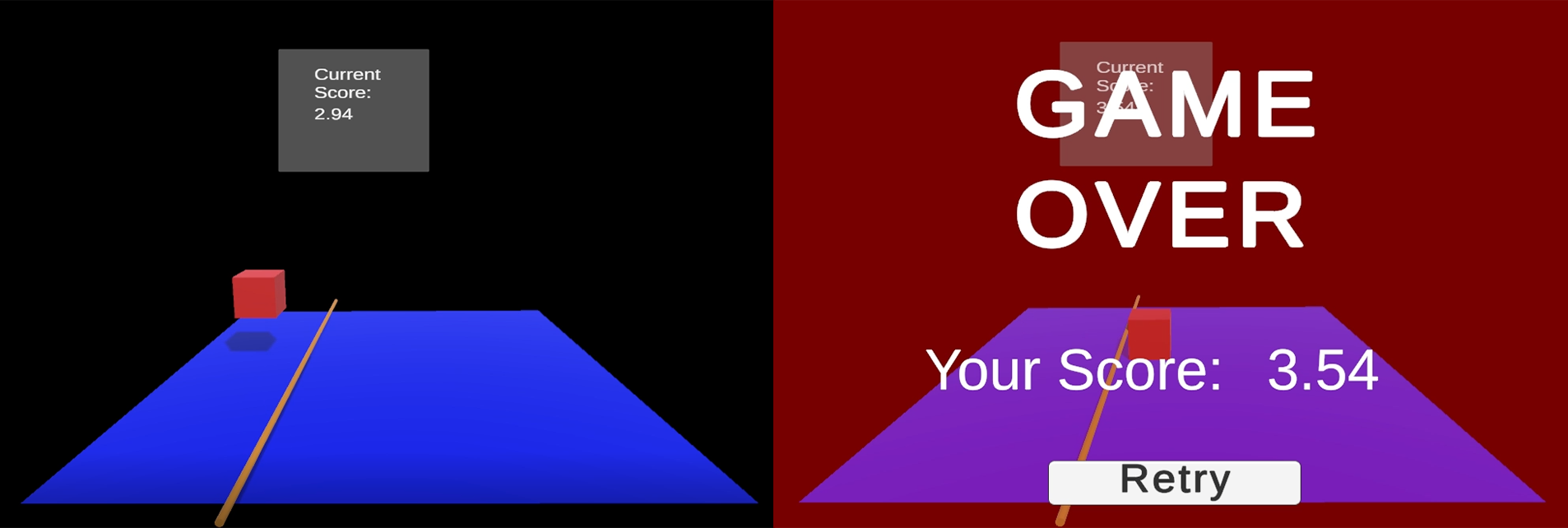
The basic concept of the game is as follows: the player, temporarily represented by a cube, must jump over the moving beam that increases in speed over time. If the player touches the beam, its game over, and their score is equal to the amount of time they managed to play without colliding with the beam. I intend to create power-ups, and various increases in difficulty such as changes in player size, jump height, multiple and thicker beams, and potentially holes in the ground for the player to avoid.

I’m really pleased with how the game is coming along, and its rewarding to see such quick progression in comparison to my other project. I’ve been able to code a significant portion of the game myself, and I’ve been taking detailed notes on player movement which will be valuable for future projects. I’ve attached below a screenshot of the game in its current state, and another showing the game over screen.

Thanks for reading,

Jack

Game in Current State
Blog Image 1

Door Entry/Exit – 23/05/2023

I’ve just finished working on the door entry/exit system. Previously, I had created a scene management system and intended on changing the scene when entering the house and returning to the previous scene when the player exited the house. After a bit of Googling, I decided to scrap that idea and stick to one scene, by having the interior of the house located at a different position within the same scene. This way, I could teleport the player into the building using the sprites transform position and do the same on their way out. I created two methods: one for the house entry and the other for the house exit. Within these methods, I used if statements to check which collider the player had made contact with, and then used the relevant coordinates to teleport the player to the correct position. I invoked a delay for the teleportation to allow the door animation to finish before the player entered, providing a smoother transition between each entry/exit.

Thanks for reading,

Jack

Game Update – 21/05/2023

Lately, I haven’t been able to spend as much time on the game as I would like, but I’ve been doing what I can with what little time I have. Mostly, this has been spent polishing the fishing mechanics. Realistically, fishing was unnecessary, and I could have spent that time developing the core game mechanics and made greater progression overall with the game. This in some ways is a lesson learnt with regards to prioritising different aspects of the game, but I’ve learnt a lot whilst creating the fishing mechanic, so I don’t see this as wasted time, just something to take into consideration going forward.

My next job is editing the player movement script. The tutorial I followed for my player movement used the player transform to move the sprite, this is causing issues with collisions and physics, which is not something I was aware of when I started making the game. I’m hoping this will be a fairly simple process of changing over from transform to rigidbody so I can move onto the door entry/exit system, then it will be time to think about some dialogue and level design!

Thanks for reading,

Jack

Snow! - 06/05/2023

Just a quick post about the game today. I started editing my terrain tiles and trees to make a snowy area in the game, which was super quick and simple, yet effective. I also created an empty canvas in Aseprite, dotted around some faint white pixels, created a new frame, then flipped the pixels vertically on the second frame to make a quick snowfall animation. I also fixed a bug that caused the player to drift if an NPC collided with him.

Thanks for reading,

Jack

Screenshot of Snowy Area
Blog Image 1

Wizard House Update - 05/05/2023

Last night I spent a bit of time working on a few sprites for the wizard’s house. It only took around 45mins to make some basic pieces of furniture and items to go with them. I didn’t do a lot of shading on the sprites, as I don’t feel that the furniture items need too much work done to them, seeing as they are not the main focus of the scene. I may return to them and improve or replace them if I feel the need, but for now, they are helping me to get a feel for how I’d like the game to look further down the line.

A lot of the game mechanics are in place now so I’m starting to think about creating some levels and storyline. I haven’t decided whether to design the fighting mechanic and animations for the game now, or to keep the player passive and do some level design and story and implement the fighting mechanic and enemies after.

Thanks for reading,

Jack

Screenshot of Wizard House
Wizard_House

Fishing! - 01/05/2023

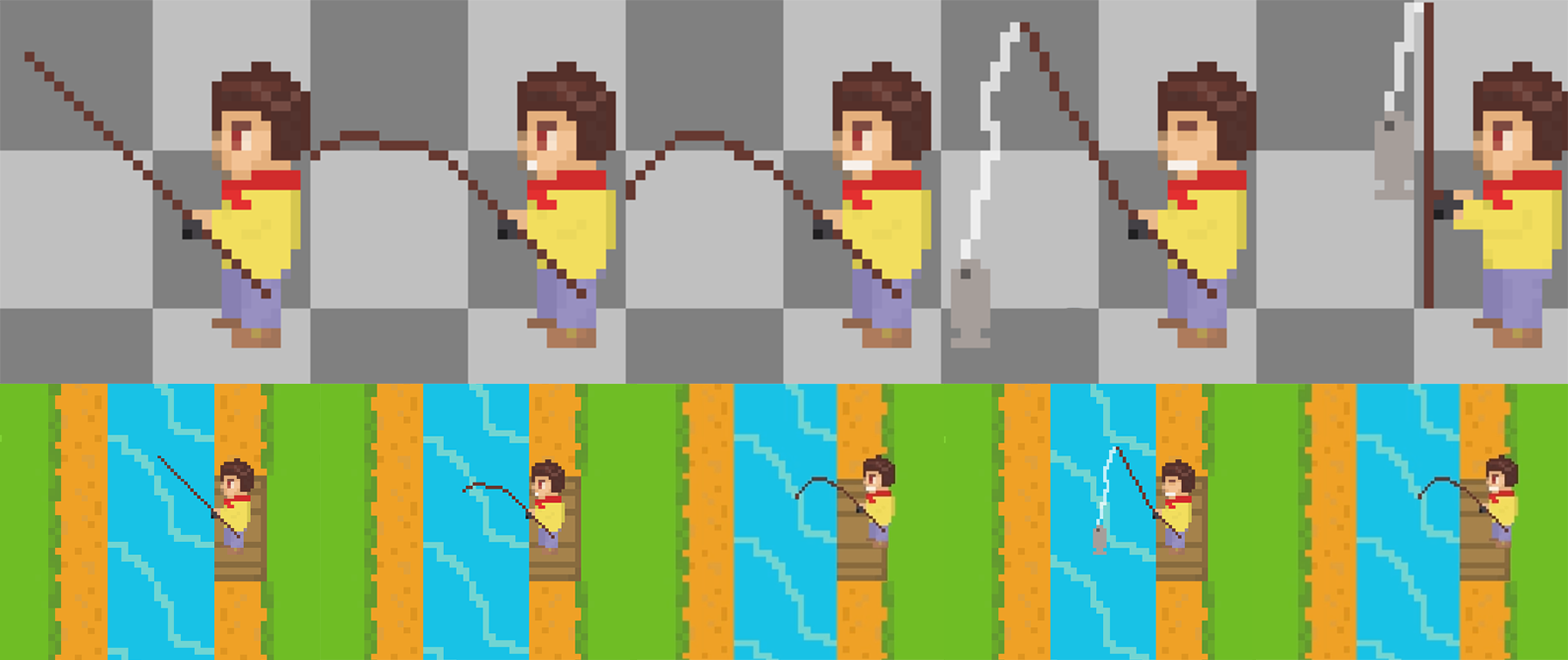
Yesterday I started work on a fishing mechanic for the game. I decided (for now, at least) fishing would be triggered when the player stepped onto a fishing platform, the rod would appear, then a random amount of time would pass, the animator would then play a catching fish animation, and finally a UI box would be displayed with the species and weight of the fish caught. I set myself the goal of coding the fishing mechanic myself which I did! It was once I got to the UI system that I started to struggle, and I did get stuck for a very long time. I had an issue trying to get the UI box to appear and disappear when the fish had been caught. I also struggled to get the fishing sequence to start over once a fish had been caught. I used ChatGPT to help with some code and left myself lots of notes for future reference. I’m going to move onto the interior of the wizard’s house for now, but I may return to fishing to make it more interactive in future.

Thanks for reading,

Jack

Fishing Animation in Aseprite and in-game
Blog Image 1

Quick Post – 30/04/2023

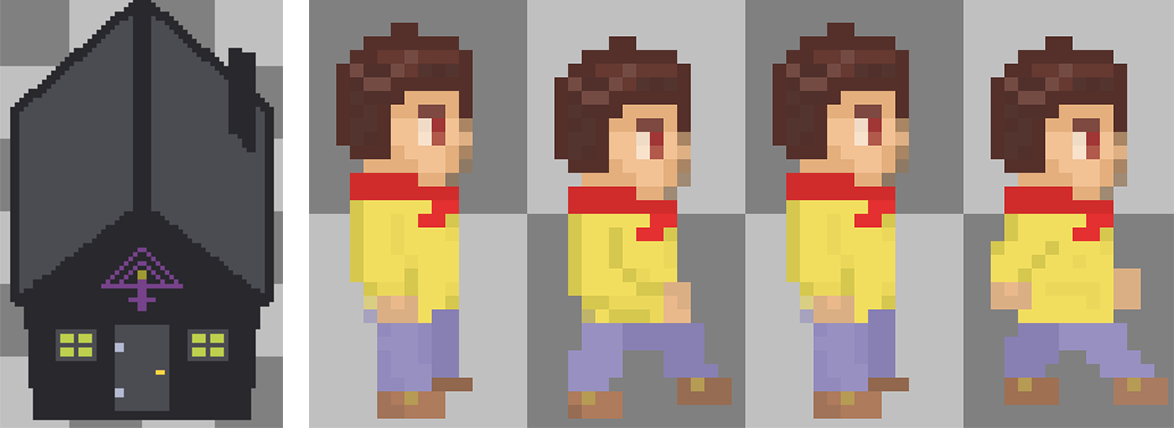
Just a quick post today. Did a bit of work in Aseprite editing the main characters walk animation as I wasn’t happy with it. I also modified my house sprite to make it black with a purple logo, this will serve as the wizard’s house in the game.

Thanks for reading,

Jack

Screenshot of Black House & Walk Animation in Aseprite
Blog Image 1

Animator Transitions - 29/04/2023

I’ve just finished editing, animating, and importing the female sprite into the game. I thought I’d do a quick post on animation transitions. Transitions between animated states are set to occur when certain conditions are met. Below I’ve attached a screenshot of the animator transition window. The arrows represent the transitions, and the labelled boxes (nodes) represent the animation for that state. The player or NPC can walk or stand idle in 4 different directions in my game so there are lot’s of transitions for what seems like a small number of movements. That being said, transitions look harder than they are, once the script has the correct variables set for the transition conditions, its just a case of selecting and correctly setting the conditions for each event.

Thanks for reading,

Jack

Screenshot of Transitions for Female NPC
Blog Image 1

Female Sprite - 29/04/2023

Started working on a female sprite for the game this morning in Aseprite. I filled my wizard character sprite with a skin tone colour for the base of my character, this saves me having to redo all of the basic body shape. Still needs some editing and shading but I’m happy with how its coming along.

Thanks for reading,

Jack

Screenshot of Female Sprite
Blog Image 1

Dialogue System – 28/04/2023

Today I followed the dialogue tutorial on YouTube, and I now have a fantastic, fully functioning, dialogue system! When the player approaches an NPC who he is able to initiate a conversation with, he can press button 1 when in range to trigger the dialogue system, the dialogue box appears with the NPCs name and the text is written character-by-character until all the sentences in the queue have been read, then the dialogue box disappears and the game resumes. This system was too advanced for me to have written by myself so following a tutorial was an excellent way to learn. I always leave lots of notes in my code and save all tutorial videos to a YouTube playlist in case I need to refer back to them at a later date or for another project.

Thanks for reading,

Jack

Scene Transitions - 27/04/2023

Today I set to work on the scene transition from the test area, into the house, and back out to the test area. I’ve done scene transitions before but not for entering/exiting buildings. I created an empty game object in my scene, added box collider 2D, and set it as a trigger. I then positioned the collider over the interior door of the house, in my player script I had already setup the collision detection for the exterior door, so I added a short bit code to this so it could detect if the player had collided with the interior door. Then, in a scene management script I set the scene to change back to the test area when the player collides with the interior door. This worked fine but I found the instant scene change to be harsh when playing the game. I had no idea how to delay the scene change so asked ChatGPT for help, it suggested creating a method for each scene change and invoking the method with a float parameter for the time delay which worked perfectly! Next, I need to make sure the player is in the correct position once he returns to the test area. Then, I can move onto the dialogue system tutorial.

Thanks for reading,

Jack

Game in Unity - 25/04/2023

Quick post with a screenshot of the game in Unity in its current state. Everything is as it was before the scene corruption. I’ll be implementing the dialogue system over the next few days. Then, I’ll be designing the interior of the house and setting up a scene transition so when the player enters the house, the test area disappears, and the house interior is shown.

Thanks for reading,

Jack

Game in Unity Editor
Blog Image 1

Unknown Error - 25/04/2023

Ironically after I wrote the last post regarding the current state of the game, I opened up Unity to take some screenshots for the blog and was greeted with a red error message stating there was an unknown error while loading my scene! After a quick google and a conversation with ChatGPT I had a few potential fixes to try out in an attempt save many hours of work. I tried: re-importing the scene, deleting scene metadata, editing the unity scene file, copying the entire project folder and re-importing... all to no avail. I did have a backup, but it was 9 days old, so it wasn't of much use. Needless to say, I'll be far more vigilant with my backups going forward. Fortunately, it was only my scene that was corrupted, and my assets and scripts were still present. So, I set about painting a new test area from the tile palette and configuring my various assets with the correct scripts and settings. I tried to remind myself that though annoying, it was probably a good opportunity to reinforce what I'd learnt, and the game is now back to its previous state.

Thanks for reading,

Jack

Website Relocation - 25/04/2023

Originally, I hosted a free WordPress site with 000Webhost and I was going to use that for the blog. But once I had the site setup to my liking and had my first two blog posts, I realised I’d already used around 40% of my 300MB available space. Also, Google Chrome was annoyingly flagging the blog page as a potentially dangerous site.

So, I began looking around for free alternatives but, I didn’t really find anything worthwhile. Later that day I happened to be on someone else’s blog reading an ATtiny85 rubber ducky tutorial (which I’ll be starting soon) and wondered how they were hosting their site. I had a look around the site and found they were using GitHub Pages, so I went over to YouTube and searched for a GitHub Pages free website tutorial and began building my page. I downloaded my original site via FTP using filezilla, I thought it would be worth trying to transfer the website files to my new GitHub page. I wasn’t overly optimistic as my original site was using the WordPress content management system and my GitHub Page wasn't - long story short, it didn’t work. So, I started setting up the new page using HTML with ChatGPT there to help when I needed it, and here we are! GitHub Pages has 1GB of available free space which should keep the blog going for a while, if I get close to exceeding that, I can consider my options as to what I'll do next, but for now I’ll be keeping the blog here.

Thanks for reading,

Jack

Current State of the Game - 24/04/2023

In this post I thought I'd discuss the game in its current state, what I'm working on now, and what's next.

Currently the game has a small test area with trees, water, and a house. There is a playable character who is fully animated and can be controlled by the user. There is also a fully animated NPC wizard who patrols the test area randomly and has a single line of dialogue if the user interacts with him. The house has an animated door that opens when the player is in range and the player sprite has a fade animation to make it appear that the player has entered the building. For the input controls I've modified a touch screen thumbstick asset to make it function as a D-Pad on the left side of the screen and I have an action button on the right side of the screen which for now is being used to interact with the NPC and trigger dialogue.

At the moment I'm working on implementing a dialogue mechanic into the game. I attempted to do this myself and managed to trigger a dialogue box and text to be displayed when the player interacts with the NPC, but this wouldn't work for multiple lines of dialogue with multiple characters. So, I'm going to be following a far more advanced YouTube tutorial which is more fit for purpose.

As for the future of the game and what I'd like to achieve, I'd like to create a functioning game with a basic storyline, multiple levels, more characters, weapons, and enemies. I think this is a reasonable and achievable goal. As I said in my previous post, this game is personal project to become more proficient at programming and game design, therefore I may decide to leave this project unfinished to move onto something I believe to be more productive.

Thanks for reading,

Jack

Hello World! - 23/04/2023

In my first post I wanted to outline my intentions with the blog and discuss my current project. My aim is to collate my work into an accessible portfolio-style journal that could be presented to potential employers and to keep track of my progress for personal development. Prior to starting this blog my personal projects have gone undocumented and in some cases forgotten.

For my current project I am developing a 2D top-down RPG game for Android using Unity game engine for the game development and Aseprite for the sprite and asset design. I always attempt to write as much of the code as I can myself but when I need help I've been using a combination of: YouTube tutorials, google, and ChatGPT. I want to be completely forthcoming that the code in the game is an amalgamation of my code, tutorials, and ChatGPT. The game is a personal learning project to further my understanding of programming and game development and I currently have no intentions of releasing it on the Play Store.

I hope to upload some screenshots of the game later today and keep the blog updated as often as I can. Ideally I'd like to update the blog each time I work on the game, but due to family commitments and uni this is near impossible, so I may do a bulk update with multiple posts to keep the blog up-to-date.

Thanks for reading,

Jack